コンテンツへスキップ
Lighthouse-Infotech
  • ホーム
  • Overview
    • About Us
    • Our Partners
    • Work with Us!
  • Our Products
    • Industries We Serve
    • Point of Sales (PoS)
    • F&B Ordering
    • Property Management
    • Warehouse / Inventory
    • Online Bookings & Appointments
    • Human Resources
    • Fitness Centers
  • Success Stories
  • ショップ
  • News
  • Support
    • Help
    • Contact us
    • Forum
  • 0
  • English (US) 日本語 ภาษาไทย
  • サインイン
  • T
Lighthouse-Infotech
  • 0
    • ホーム
    • Overview
      • About Us
      • Our Partners
      • Work with Us!
    • Our Products
      • Industries We Serve
      • Point of Sales (PoS)
      • F&B Ordering
      • Property Management
      • Warehouse / Inventory
      • Online Bookings & Appointments
      • Human Resources
      • Fitness Centers
    • Success Stories
    • ショップ
    • News
    • Support
      • Help
      • Contact us
      • Forum
  • English (US) 日本語 ภาษาไทย
  • サインイン
  • T

ようこそ!

This community is for professionals and enthusiasts of our products and services.
If you have any questions, technical support needed or just want to discuss with us please post here.  

Hide Intro Register
コミュニティで交流するには登録する必要があります。
全てのポスト 人々 バッジ
このフォーラムについて
コミュニティで交流するには登録する必要があります。
全てのポスト 人々 バッジ
このフォーラムについて
ヘルプ

POS printer question

購読

この投稿に活動があった際に通知を受け取ります

この質問にフラグが付けられました
1 返信
1480 ビュー
アバター
Agile Solutioneers NV

name : Anil Singh

Phone Number : +597 8581314

email : info@agilesolutioneers.com

company : Agile Solutioneers NV

Inquiry details : Dear Support,


My name is Anil Singh. We are a Odoo partner in Suirname and one of our customers is seeking to Odoo but it must have a kitchen printer and a bar printer.

The kitchen printer is for a the food that need to be prepared and the bar printer is for all the drinks that need to be served.


Please let me know if you can assist us with this.


Thank you,


Anil Singh

0
アバター
破棄
アバター
Lighthouse-infotech

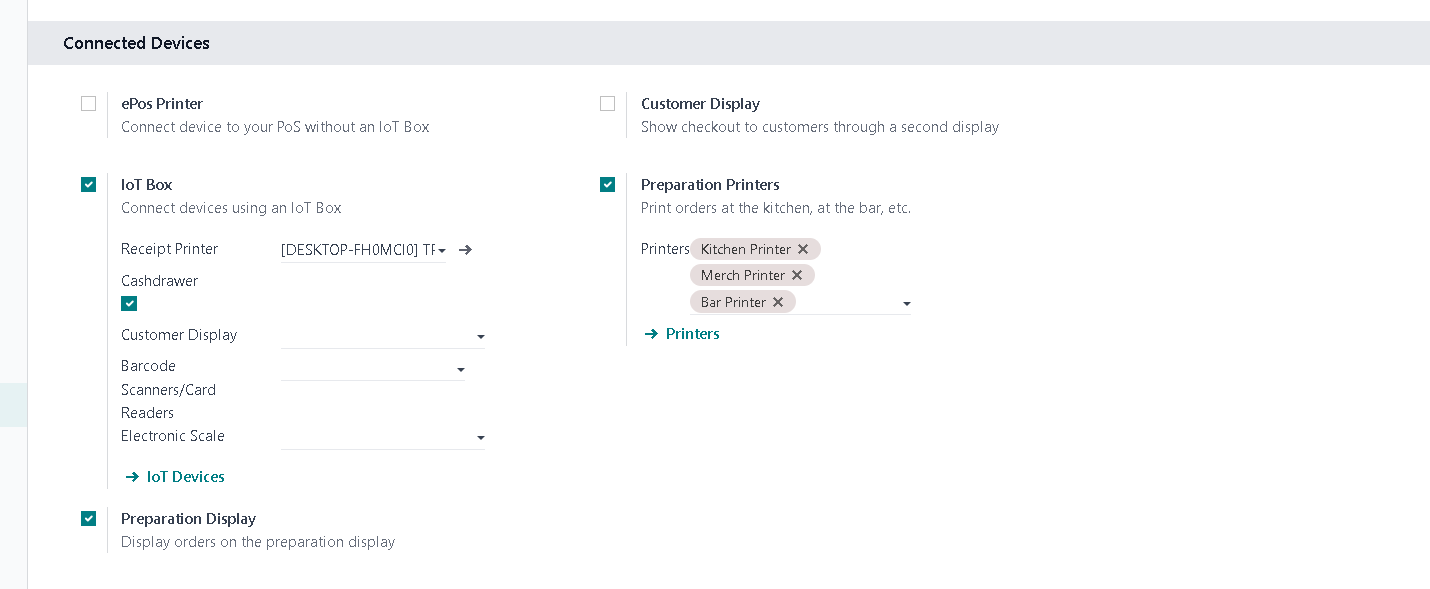
Thank you for your question.  Yes, you have a variety of choices for setting up kitchen/bar printers.  First, decide if you want to use (or if available in your region) Epson thermal printers.  If so, they are pre-configured to work with Odoo as ePOS printers.  You can set your printers in POS settings/configuration as in our screen shot.  

If Epson printers are NOT viable for you, then perhaps you might want to use a virtual IOT box (which we use).  This means that you can use ANY brand of printer as well as connecting any number of smart devices (e.g., tablets for table side ordering).  As long as the device is on the same network as your DB, you can connect to it easily.  Set your printer IP to static outside of the DHCP router range.  

Here is the video to see virtual IOT box set up - unlimited hardware connectivity: 


Good luck and keep in touch! 


0
アバター
破棄
ディスカッションを楽しんでいますか?読むだけでなく、参加しましょう!

今すぐアカウントを作成して、限定機能を利用したり、素晴らしいコミュニティと交流しましょう!

サインアップ

info@lighthouse-infotech.com

Social Media

Grab Our Cool Nwesletter!
Lighthouse-Infotech Co., Ltd. 2019.  All rights reserved.  
English (US) 日本語 ภาษาไทย
Powered by <font style="vertical-align: inherit;"><font style="vertical-align: inherit;"><font style="vertical-align: inherit;"><font style="vertical-align: inherit;">Odoo</font></font></font></font> - #1 オープンソース Eコマース